
PPE with handover and signature
PPE catalogue, individual or bulk handovers, returns, a PDF receipt and the worker’s signature drawn on screen or requested later from their own space.
Occupational health and safety
CheckOne is a web application to manage the PPE and materials you hand out to workers, own and subcontracted machinery, and the documents of suppliers, subcontractors and clients. It warns you before anything expires and keeps the evidence ready for any review.

See it in action
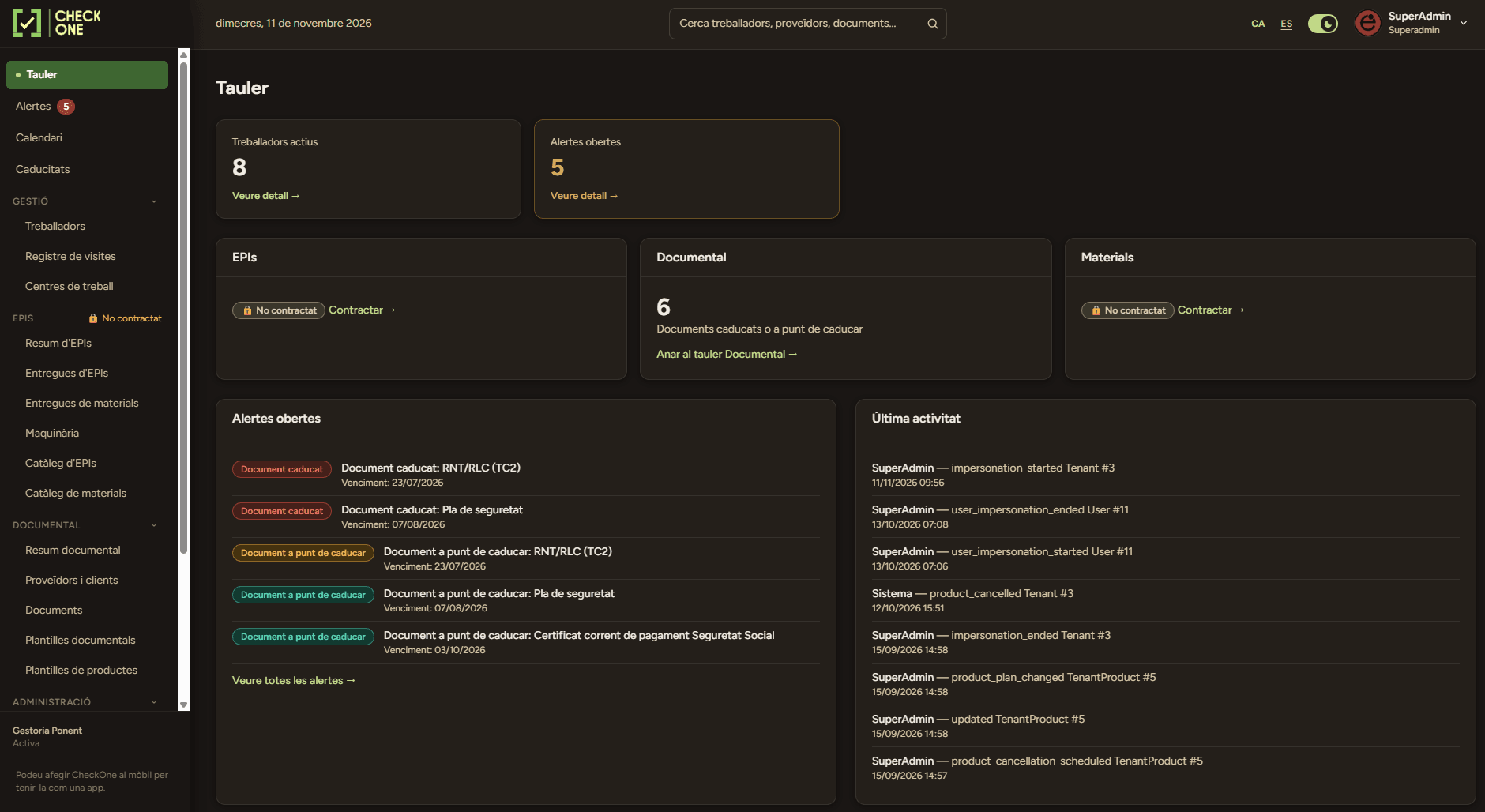
Alerts dashboard, PPE handovers, machinery and the document status of third parties.
The problem
Knowing who received which PPE, which machine has an overdue inspection or which subcontractor’s certificate is out of date should not depend on one person’s memory. When information is scattered, expiries slip through and reviews are hard to justify.
PPE handovers with no receipt or worker signature, and stock that does not add up by size.
Machinery inspections, insurance and certificates that expire without anyone being warned.
Supplier and subcontractor documents scattered across emails and folders, impossible to check at a glance.
Evidence that is hard to gather when a review, an audit or a visit comes up.
Our answer
CheckOne is organised into modules that the company subscribes to according to its needs: PPE, materials and machinery, and document control for third parties. Both share workers, work centres, alerts and the activity log.
PPE catalogue, individual or bulk handovers, returns, a PDF receipt and the worker’s signature drawn on screen or requested later from their own space.
Each PPE item counts its stock as a single total or by size/type, and on handover only the sizes that are actually left can be chosen.
A record for each machine with status, owner and contract type, inspections and linked documents (technical sheet, vehicle inspection, CE marking, insurance).
Suppliers, subcontractors, clients and freelancers with the mandatory documents you define, review and approval, blocking with a reason and a PDF report.
Set how many days in advance you are warned about each family of expiries. An open alert rises in severity as the date approaches, and you receive a summary by email.
Assign workers and machinery to each centre and record the entries and exits of external visitors.
Each worker can view and confirm their PPE and sign from their phone. The application can be installed on the phone like an app.
Administrator, manager, read-only, worker and a restricted profile that sees only what the administrator selects.
How it works
Define work centres, PPE, materials and machinery catalogues, document types and how many days in advance you want alerts.
Register workers and import suppliers and subcontractors, or add them one by one.
Hand out PPE and materials with a signature, record machinery inspections and upload or review third-party documents.
Alerts warn you before each expiry and the activity history records who did what.
Requirements
A current web browser for administrators and managers.
A phone or tablet for signing handovers and for the worker space (nothing to install; it can optionally be added as an app).
Internet connection: CheckOne is a web application and does not work offline.
An email address for each user, used for sign-up verification, notifications and password recovery.
Roles and responsibilities
The administrator configures everything: users, subscriptions and settings. The manager handles the day-to-day (workers, PPE, materials, third parties and documents) without access to billing or configuration.
Sees every section in read-only mode. Designed for management, auditors or people who only need to review.
Starts with no access to anything. The administrator marks exactly what it can view or manage, and the restriction also applies to the address, not just the menu.
Accesses only their own space: sees their PPE and materials, confirms them and signs pending handovers. The company can disable this access.
Security and data
Each company works in its own space: one company’s data is not visible to any other. Each person signs in with their own user and with the permissions of their profile, two-step verification by email can be enabled, and the system records who makes each change, when and from where. Documents are downloaded under access control and each download is logged.
Frequently asked questions
If you have a question you don't see here, write to us and we'll reply as soon as possible.
No. CheckOne is a tool to manage and document what you already do: PPE handovers, machinery, expiries and third-party documentation. It does not carry out risk assessments or prevention plans, nor does it replace an in-house or external prevention service.
It is subscribed by module: one for PPE, materials and machinery, and another for document control. You can subscribe to one or both. Workers, work centres, alerts and the activity log are shared.
Yes. You can ask us for a guided demo with sample data and we will show you which modules you need.
The worker can sign with a finger or mouse on the spot, on the device of the person making the handover, or receive an email notice and sign later from their own space. In bulk handovers, signing goes worker by worker. Note that this is a handwritten signature recorded in the application, not a qualified electronic signature.
CheckOne controls who may use a machine and with what documentation: ownership or subcontracting, vehicle inspection, CE marking, insurance and upcoming inspections. emApp plans preventive and corrective maintenance and generates ISO 9001 reports. They can coexist.
Not necessarily. If you want, each worker has their own space to view and sign their handovers, but the company can disable that access and do everything from management, with the signature in person.
Yes. You can import them with a template, with a preview before confirming, or add them one by one. You can also define the mandatory documents for each type of third party.
Cancelling a module is scheduled for the end of the period already paid and the company keeps its data. If you would like a copy or permanent deletion, we will discuss it before cancellation.
See it in action
Let’s talk about how many workers, machines and third parties you manage today and we will show you which modules you need.